1099 Tracking
If your business pays contractors $600 or more in a year, you're required to file a 1099-NEC form with the IRS. AllMy Ledger helps you track these payments and manage tax forms throughout the year so you're ready at tax time.
The Contractors Page
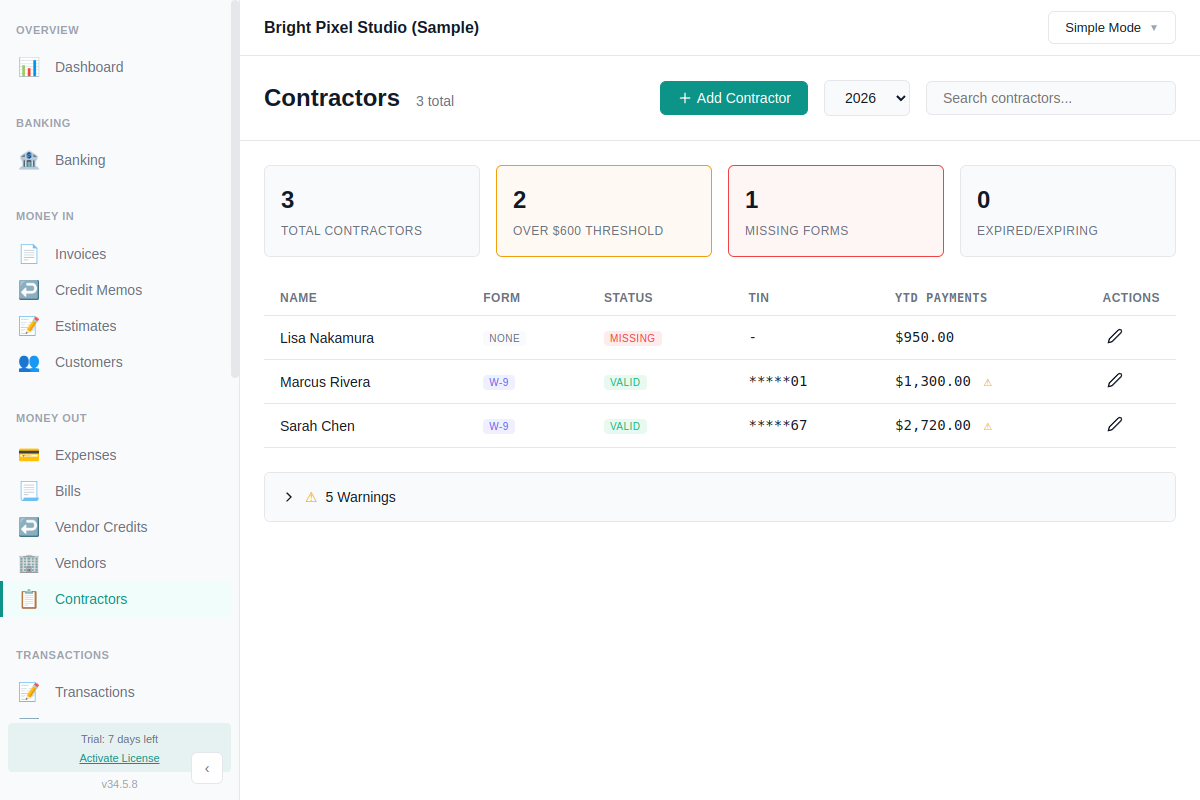
Navigate to Contractors in the sidebar (or 1099 Contractors in Accountant Mode) to see a dashboard of all your contractors with:
- Total Contractors — everyone flagged as a 1099 contractor
- Over $600 Threshold — contractors who need a 1099 filed
- Missing Forms — contractors without a W-9 or W-8 on file
- Expired/Expiring — W-8 forms nearing or past their expiration date
The table shows each contractor's name, form type, form status, TIN (masked for security), and year-to-date payments. Contractors over the $600 threshold are flagged with a warning icon.
Use the year selector at the top to view payments for any year.
Marking a Vendor as a 1099 Contractor
When adding or editing a vendor, check the 1099 contractor box. This tells AllMy Ledger to track all payments to this vendor for 1099 reporting. Every expense and bill payment you record to a 1099 vendor is automatically tracked — no extra steps needed.
Managing Tax Forms
Click the edit icon on any contractor to open the tax form panel. AllMy Ledger tracks three form types:
W-9 (US contractors)
- Business Name — if different from the contact name
- Business Type — Sole Proprietor, Single-Member LLC, C-Corp, S-Corp, Partnership, Trust, or Other
- Tax ID / TIN — SSN or EIN (required for a valid form)
- W-9 Received Date — when you received the form (required for valid status)
- Exempt Payee Code and FATCA Exemption Code — optional, under Advanced Options
A W-9 is marked as valid when both the Tax ID and Received Date are filled in. W-9 forms do not expire.
W-8BEN (foreign individuals) & W-8BEN-E (foreign entities)
For foreign contractors, AllMy Ledger tracks country, foreign TIN, treaty information, signed date, and withholding rate. W-8 forms expire automatically 3 years after the signed date — the Contractors page warns you when forms are expiring soon or already expired.
1099 Summary Report
At the end of the year (or whenever you need it):
- Go to Reports
- Select 1099 Summary
- Choose the tax year
The report lists every 1099 contractor with their total payments, threshold status, and form status. Export as PDF or XLSX for your records or to share with your tax preparer.
Note: AllMy Ledger helps you track 1099 payments and manage contractor forms. It does not generate or file 1099-NEC forms with the IRS. Use the 1099 Summary report and your contractor's tax form details to prepare your filings, or share them with your tax preparer.